Donations: Split a specific amount to transfer as a donation (e.g., to the community fund).
Partial Liquidity: Sell only a portion of your claim while keeping the rest.
Risk Management: Separate high-value claims into different wallets.
Gifting: Transfer a specific amount to another user.
Proportional Split: When you split an NFT, the Original Principal, Current Principal, and Token Claim Amount are all divided proportionally based on the percentage you select.
Gas Fees: Splitting creates new NFT mints, which will incur gas fees on Ethereum.
1
Select
Choose one NFT to split.
2
Configure
Enter the Percentage of principal you want to move to the new NFT.
Verify Recipient: Transfers are final. Always double-check the recipient address. Sending SOU to an incompatible contract or wrong address may result in permanent loss.
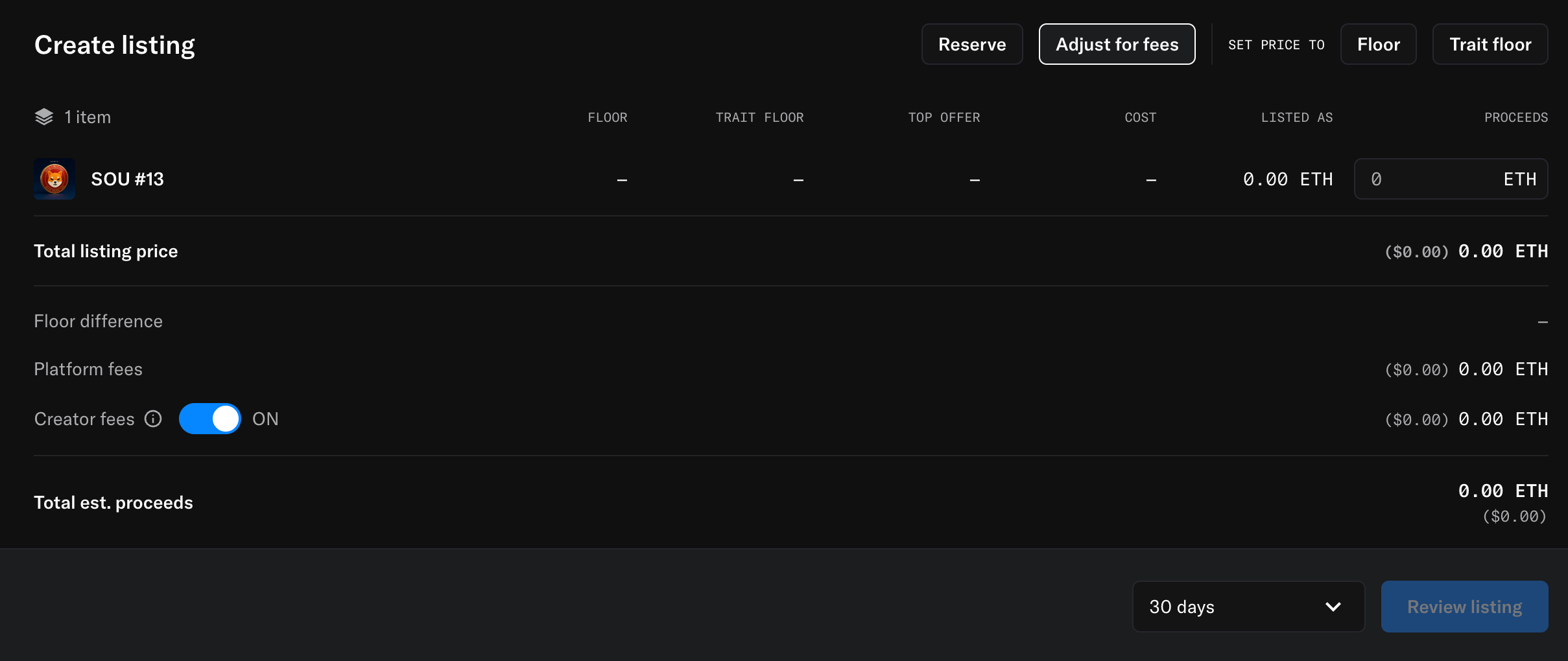
List your SOU NFT on the marketplace to provide liquidity or exit your position.You can view and trade the official Shib Owes You (SOU) collection on OpenSea: https://opensea.io/collection/shibowesyou
Platform Fee: 1% of the listing price (Automatically deducted).
Creator Fee: 5% (Optional). You can toggle this OFF or ON. Whatever is collected through creator fees will be given back to the community as payouts or rewards.
Net Proceeds: Your estimated proceeds will be the listing price minus the applicable fees.
1
Select
Choose the SOU NFT you wish to sell.
2
Set Price
Enter the Total listing price in ETH. You can also quickly set the price to the Floor or Trait floor.
3
Adjust Fees
Click “Adjust for fees” to manage the cost breakdown. You can keep Creator fees (5%) enabled to support the community, or toggle them off if needed.
4
Confirm
Click “Create listing” and confirm the transaction in your wallet.